


MINKY Gear Solar & Hand-Crank Emergency Radio
MINKY Gear Solar & Hand-Crank Emergency Radio
4-way charging: solar, hand crank, USB-C & battery
10,000mAh power bank charges your phone up to 3x
AM/FM radio for local emergency broadcasts
Built-in LED torch, reading lamp & SOS alarm
Ultra-compact & portable — ready for any emergency
Never needs a power point — powered by sunlight or you
Couldn't load pickup availability
4-6 day average shipping time

MINKY Gear Solar & Hand-Crank Emergency Radio
-

“When a storm knocked our power out, we tuned into local radio updates while the kids played cards beside the reading lamp.”
-

“My phone was nearly flat during a blackout, and I was glad we had the radio’s backup charger ready to use.”


Product Details
Product Details
The MINKY Gear Solar & Hand-Crank Emergency Radio brings radio, backup phone power, lighting and an SOS alarm together in one compact device.
• AM/FM radio for local news, weather and emergency broadcasts
• Built-in 10,000mAh power bank for charging your phone
• Solar, hand-crank and USB-C charging options
• LED torch and reading lamp
• Audible SOS alarm and flashing light
Keep it in your emergency kit, vehicle or camping bag so it’s easy to find when you need it.
How It Works
How It Works
Charge the radio using USB-C before heading out or storing it in your emergency kit. The solar panel and hand crank provide additional ways to add charge when a power point isn’t available.
Tune into your local AM/FM station to hear broadcasts without Wi-Fi or mobile data. Connect your phone to the USB output for backup charging, switch on the torch or reading lamp, or activate the SOS alarm to attract attention.
What’s Included
What’s Included
• 1 × MINKY Gear Solar & Hand-Crank Emergency Radio
• 1 × USB-C charging cable
• 1 × Instruction manual
The solar panel, hand crank, phone power bank, torch, reading lamp and SOS alarm are built into the radio.
Is It Durable Enough for Emergencies?
Is It Durable Enough for Emergencies?
Absolutely! Its rugged, splash-resistant design is made for outdoor conditions, while the built-in dual LED torches provide extra lighting during blackouts and emergencies.


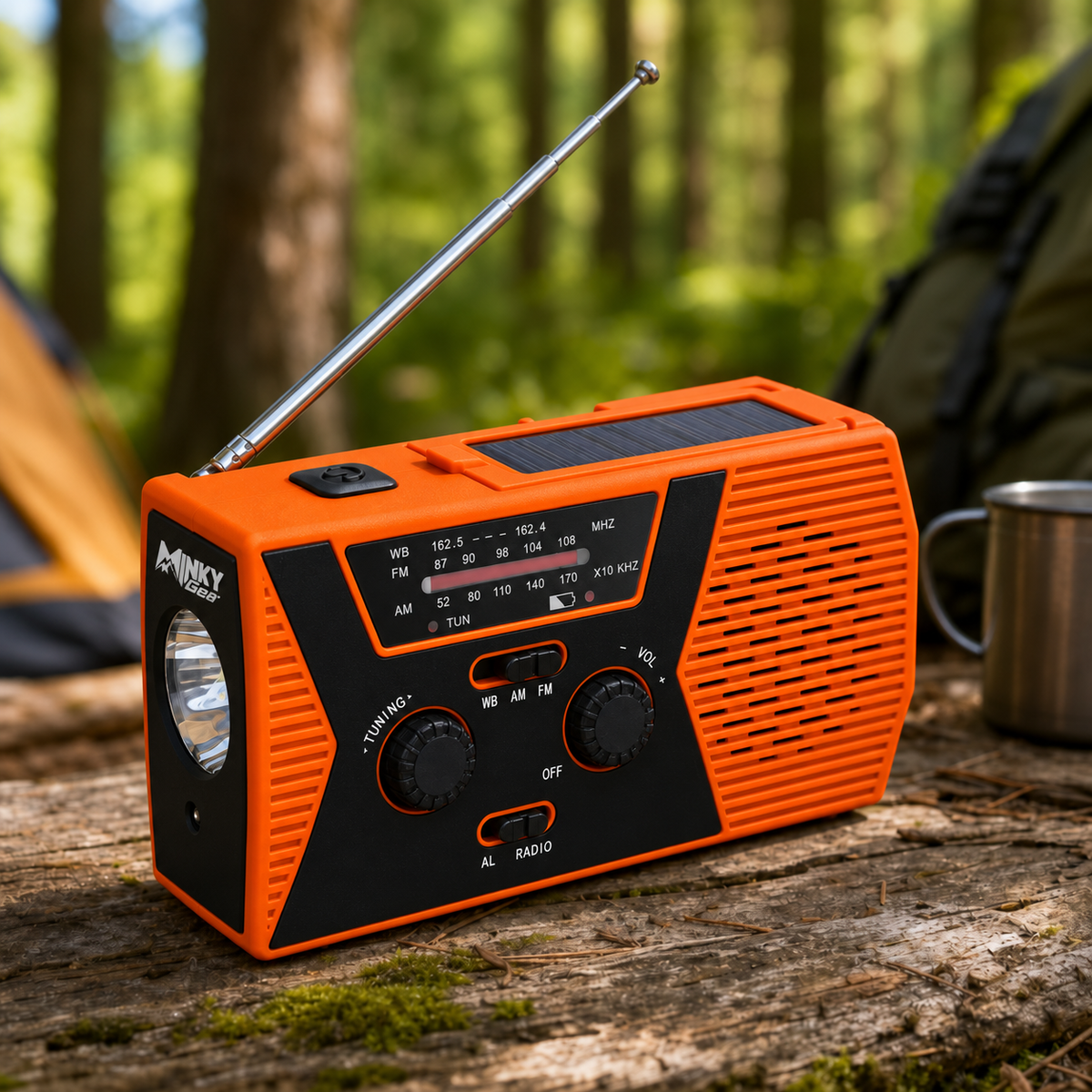

Stay Informed When the Power Goes Out
Hear local AM/FM updates, light up the dark and keep backup power ready for your phone—all in one compact device. Charge by USB-C before you need it, with solar and hand-crank options to add charge when a power point isn’t available.
FAQs
Can I receive emergency updates in Australia?
Can I receive emergency updates in Australia?
Yes. Tune into your local ABC Radio station or another AM/FM broadcaster for local news, weather and emergency updates. Reception depends on your location and available broadcasts.
Does the radio need Wi-Fi or mobile reception?
Does the radio need Wi-Fi or mobile reception?
No. AM/FM broadcasts are received directly through the radio’s antenna, without Wi-Fi, mobile data or a subscription.
How do I charge it?
How do I charge it?
Charge using USB-C, the built-in solar panel or the hand crank. We recommend charging it fully by USB-C before putting it in your emergency kit.
Can it charge my phone?
Can it charge my phone?
Yes. Connect your phone’s charging cable to the USB output. The built-in 10,000mAh power bank provides backup charging; the number of charges depends on your phone and other functions being used.
How long does the battery last?
How long does the battery last?
Runtime varies with radio volume, lighting and phone charging. The solar panel and hand crank provide ways to add charge when a power point isn’t available.
What does the SOS function do?
What does the SOS function do?
It activates an audible alarm and flashing light to attract attention. The built-in torch and reading lamp also provide light during blackouts or camping trips.